Principal Component Analysis (PCA) Software Module
The EOS Instruments PCA software add-on is a powerful tool for performing batch-to-batch Principal Component Analysis.
PCA is a mathematical and statistical method used in exploratory data analysis to reduce the dimensionality of complex, multiparametric datasets, i.e. reducing the number of significant variables for a given system without losing data significance.
The software also implements sample classification through supervised machine learning, using algorithms such as K-nearest neighbours (KNN). This option excels in assessing the consistency and reproducibility of production processes from batch to batch.
The PCA software must first be trained on a representative and meaningful dataset.
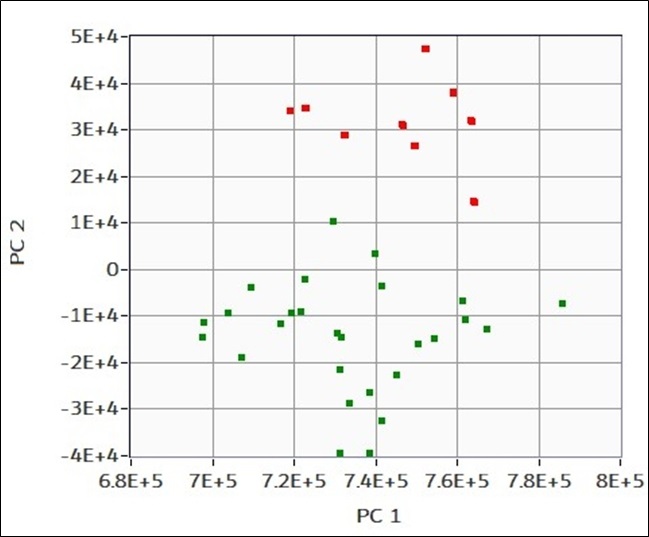
In this example the training dataset is made of 25 samples of 750 nm polystyrene particles, labelled as “good” (green), and 10 similar samples with a small impurity of silicon oil, labelled as “bad” (red). All samples were prepared, diluted, and measured using the Classizer™ ONE.
The PCA software is then run on these two labelled datasets, obtaining as output the plot on the left. On the axes there are the first two principal components the software identified, PC1 and PC2.
Mathematically, these are the eigenvectors of the data covariance matrix, and the point positions represent the associated eigenvalues projected onto this new coordinate space.
As shown in the plot, the two datasets form clearly distinct clusters, demonstrating a clear separation between good and bad samples.
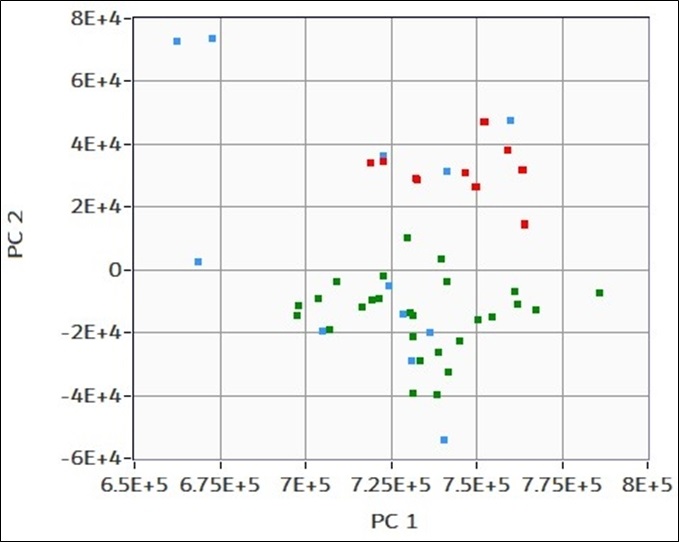
A set of 10 unknown samples is measured and analysed using the PCA model trained on the previous dataset.
These new samples are projected onto the principal component (PC) space defined during training and are shown in blue on the plot on the left. Notably, 5 samples fall within the green “good” cluster, one in the red “bad” cluster and the remaining 4 are located far from both.
Using the integrated supervised machine learning algorithm, the software automatically classifies these unknown samples by labelling them as “good,” “bad,” or “not compatible,” based on their proximity to the original clusters in the PC space.